

When processing a deposit refund in the SIRE app, the system will first check if an interest setup exists for that deposit. If so, interest-related fields will be displayed on the refund screen to complete the process correctly.
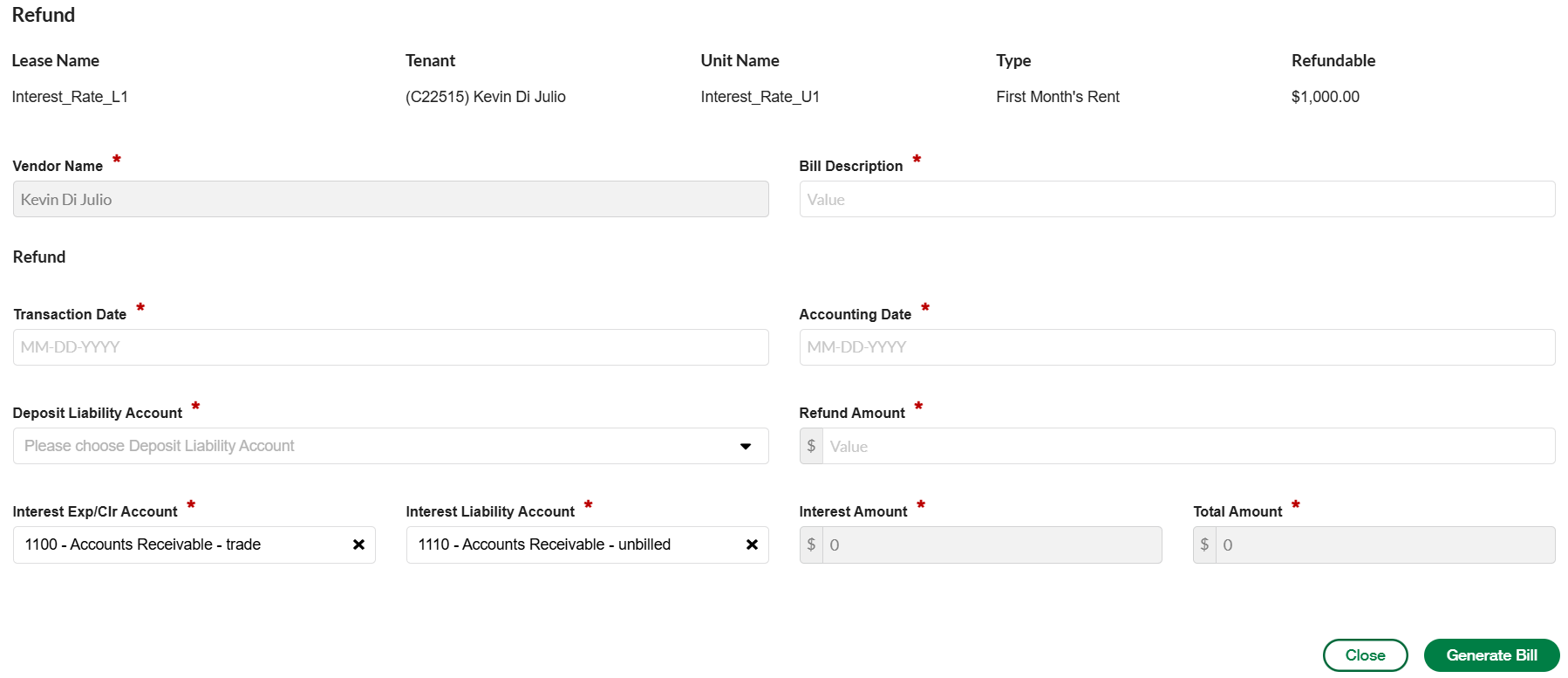
Key Fields on the Refund Screen for Deposits with Interest
These fields are important for correctly calculating and recording the interest:
|
Field |
Description |
|---|---|
|
Transaction Date |
This is the cut-off date for calculating interest. The interest amount will be calculated up to this date. |
|
Interest Exp/Clr Account |
This is the General Ledger (GL) account used for the expense or clearing of the interest. It is auto-filled from the lease’s interest setup. |
|
Interest Liability Account |
This is the GL liability account that records the interest owed to the tenant. It is auto-filled from the lease’s interest setup. |
|
Interest Amount |
This shows the calculated interest on the refunded amount. It is not editable and is automatically determined based on the refund and lease setup. |
|
Total Amount |
This is the sum of the refund amount and the interest amount. It represents the full amount payable to the tenant. |
How Interest is Calculated
If the interest setup uses compound interest, the SIRE app uses the following standard formula:
Compound Interest Formula
A = P(1 + r/n)^(nt)
Where:
-
A = Final amount including deposit and interest
-
P = Original deposit amount
-
r = Annual interest rate (as a decimal, e.g., 5% = 0.05)
-
n = Number of times interest is compounded per year
-
Example: Annually (n = 1), Quarterly (n = 4), Monthly (n = 12), etc.
-
-
t = Number of years the deposit was held
Example:
If a deposit of $1,000 is held for 2 years at an annual interest rate of 5%, compounded annually:
A = 1000 × (1 + 0.05/1)^(1×2) = 1000 × (1.05)^2 = $1,102.50
The interest amount would be $102.50 and the total refund would be $1,102.50.
✅ Summary
-
The SIRE app automatically calculates interest if it’s configured on the lease.
-
You’ll need to confirm the correct GL accounts.
-
The refund screen displays all the necessary fields—some auto-filled, some user-editable.
-
The system ensures accurate accounting for both the deposit and the interest owed.
-
The Bill would have one line with the Refund amount and one line with the Interest amount displayed.
-
A GL journal entry would be created with the Interest accounts and the interest amount displayed.