Where to Find It
When you navigate to the Deposit tab of a Lease, you’ll see an Interest Setup icon (enabled only for Refundable deposit types):

Note: Interest setup is optional.
Property-Level Defaults
If interest settings have already been configured at the Property Level, these will automatically populate when a new Lease is created.
If not, you can manually set up deposit interest for each lease by clicking the Interest Setup icon next to the deposit.
Configuring Interest Settings
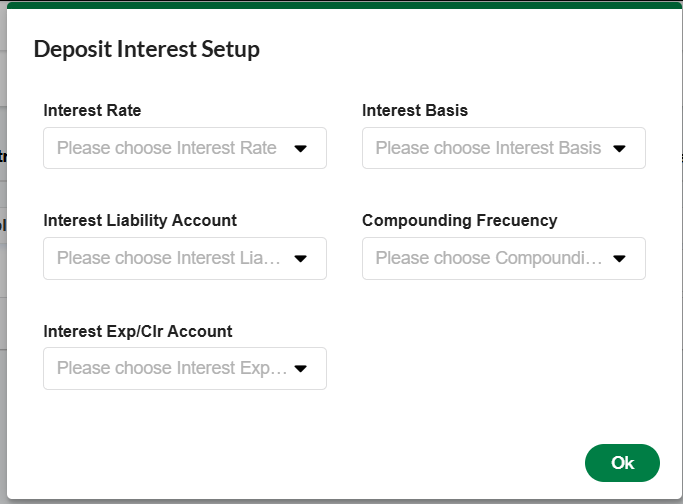
Clicking the Interest Setup icon opens a modal where you can configure the following fields:
|
Field |
Description |
|---|---|
|
Interest Rate |
Choose from predefined interest types set in the Interest Rate Setup menu. Custom types can also be added under My Preferences. |
|
Interest Basis |
Select how interest should be calculated: - Actual Days: Uses the exact number of days in each month. - 30-Day Month: Assumes 30 days in each month. |
|
Interest Liability Account |
Select the GL account where the interest liability will be recorded. |
|
Interest Exp/Clr Account |
Select the GL account for interest expense and/or clearing. |
|
Compounding Frequency |
Choose how often interest is compounded:
|
Important Notes
-
Interest setup can be configured per deposit, allowing flexibility across different lease agreements.
-
The values set in this modal are used to calculate interest during Refund, Apply, or Transfer processes involving refundable deposits.