
1. Introduction
Purpose
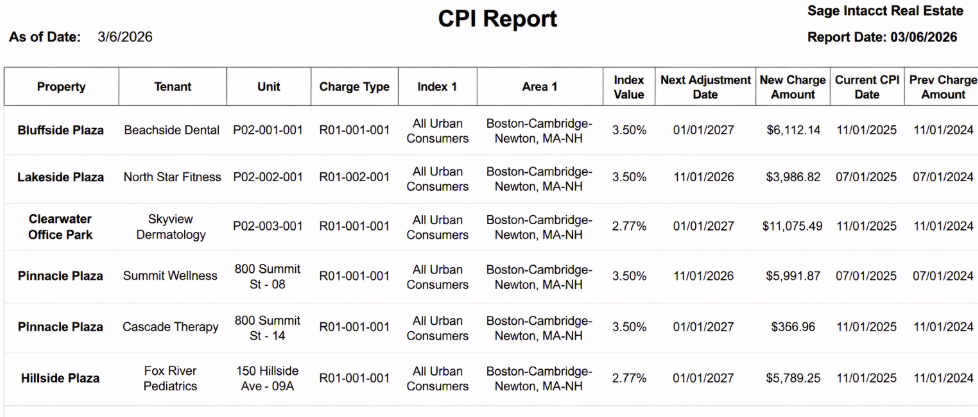
The CPI Report provides a property-grouped view of CPI-related charge adjustments for lease recurring charges.
It helps users review charge changes, CPI reference dates, index context, and next adjustment timing for selected lease records.
Aggregation Level
The report is displayed at a property-grouped detail level.
The structure follows this grouping:
-
Property
-
CPI detail rows within each property at the Item_Id level
Each row represents one recurring charge CPI record associated with a lease, unit, and tenant context.
2. How to Use the Report
Step 1 - Select Filters
Open the report and set the parameters in the following order:
-
Entity ID (multi-select)
-
Property Name (multi-select)
-
As of Date
-
Lease Status (multi-select)
-
Item Id (multi-select)
-
month_to_month (multi-select)
Step 2 - Run the Report
After selecting the parameters, run the report.
Step 3 - Validate Header Information
At the top of the report, verify the following:
-
CPI Report title
-
Selected As of Date value
-
Report Date timestamp indicating when the report was generated
Step 4 - Review the Table Output
The table is grouped by Property.
Detail Columns
The report displays the following fields:
-
Tenant
-
Unit
-
Charge Type
-
Index 1
-
Area 1
-
Index Value
-
Next Adjustment Date
-
New Charge Amount
-
Current CPI Date
-
Prev Charge Amount
-
Previous CPI Date
Expected Display
-
Rows appear under each selected Property
-
The selected filters determine which lease recurring charge records are displayed
-
Index Value is shown as a percentage value based on the CPI adjustment calculation
3. Technical Explanation
Date and Filter Behavior
This report applies user-selected filtering using the following parameters:
-
As of Date
-
Property Name
-
Lease Status
-
Item Id
-
month_to_month
Default Behavior
The report uses the following default value:
-
As of Date defaults to today
This allows users to review CPI-related charge adjustments based on the current reporting date unless a different date is selected.
Table Structure
The report combines two structural levels:
-
Property grouping, which organizes CPI records by property
-
Row-level CPI adjustment detail, which shows charge and CPI values for each record
The table is designed to let users compare previous and current CPI-related values and review upcoming adjustment timing within the same row.
Granularity Explanation
The report maintains charge-record level granularity.
Each row represents a specific recurring charge record tied to a lease, unit, and tenant context. This level of detail allows users to validate individual CPI adjustments and reconcile charge changes at the record level.
Property grouping supports easier navigation and portfolio-level review.
4. Troubleshooting
No Data Returned
Possible causes:
-
Selected filters are too restrictive
-
No matching records exist for the selected As of Date
-
The selected Lease Status, Item Id, or month_to_month values exclude available records
Possible fixes:
-
Broaden the Lease Status, Item Id, and month_to_month selections
-
Add more properties
-
Change the As of Date and rerun the report
Missing Expected Charge Row
Possible causes:
-
The selected item or status values exclude the row
-
The record does not match the selected date context
Possible fixes:
-
Include additional Item Id values
-
Broaden the Lease Status filter
-
Try a different As of Date
Unexpected Index Value or Amount Change
Possible causes:
-
Percentage values and charge amounts reflect CPI adjustment calculations and displayed rounding
Possible fixes:
-
Compare Prev Charge Amount, New Charge Amount, and the CPI dates within the same row
-
Recheck the selected filters to confirm you are reviewing the intended record set
Limited Filter Options
Possible causes:
-
Filter values depend on the current environment context and prior selections
Possible fixes:
-
Select Entity ID and Property Name first
-
Re-open dependent filters such as Lease Status, Item Id, and month_to_month
-
Confirm the relevant records are active in your environment
5. Customization
Common enhancement requests for this report include the following.
Field Customization
-
Add or remove displayed CPI columns
-
Rename column headers to match client terminology
-
Reorder columns to support export or review workflows
-
Add more CPI information: Area 2, Index 2
Filter Behavior Changes
-
Add additional filtering options
-
Change default parameter behavior
-
Adjust dependent filter ordering
Reporting Enhancements
-
Add summary totals by property
-
Add highlights for upcoming adjustment dates
-
Add export-specific formatting for downstream processes
These modifications can be requested as a report customization through the customer portal.