
1. Introduction
Purpose
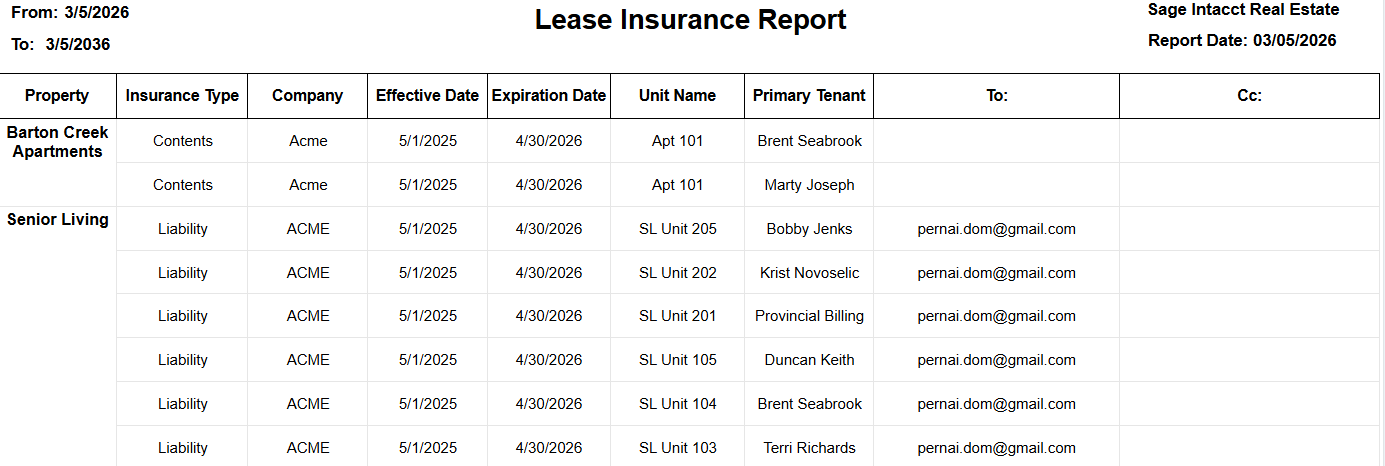
The Lease Insurance report provides a centralized view of lease-linked insurance records, including policy timing, recipient contacts, tenant context, and property grouping.
It helps users monitor active and upcoming insurance expirations and validate communication details tied to each insurance entry.
Aggregation Level
The report is displayed at a property-grouped detail level.
The structure follows this grouping:
-
Property
-
Insurance detail rows within each property
In practice, each detail row represents one insurance record associated with a lease, unit, or tenant context.
2. How to Use the Report
Step 1 - Select Filters
Open the report and set the parameters in the following order:
-
Entity ID (multi-select)
-
Property Name (multi-select)
-
From Date
-
To Date
-
Lease Status (multi-select)
-
Insurance Type (multi-select)
Step 2 - Run the Report
After selecting the parameters, run the report.
Step 3 - Validate Header Information
At the top of the report, verify the following:
-
Lease Insurance Report title
-
Selected From Date and To Date
-
Report Date timestamp indicating when the report was generated
Step 4 - Review the Table Output
The table is grouped by Property.
Detail Columns
The report displays the following fields:
-
Insurance Type
-
Company
-
Effective Date
-
Expiration Date
-
Unit Name
-
Primary Tenant
-
To:
-
Cc:
Expected Display
-
Rows appear under each selected Property
-
Date, lease status, and insurance type filters control the number of returned rows
-
Contact columns (To: and Cc:) display the email recipients associated with each insurance record
3. Technical Explanation
Date and Filter Behavior
This report applies user-selected filtering using the following parameters:
-
From Date and To Date define the expiration date window for insurance policies
-
Lease Status filters records based on the status of the associated lease
-
Property Name limits the report to selected properties
-
Insurance Type limits results to specific types of insurance policies
Default Date Behavior
The report uses the following default values:
-
From Date defaults to today
-
To Date defaults to 10 years from today
This allows users to monitor both near-term insurance expirations and longer-term policy timelines without frequently resetting filters.
Table Structure
The report combines two structural levels:
-
Property grouping, which organizes insurance records by property
-
Insurance detail rows, which show policy timing, tenant context, and communication contacts
This layout allows users to review insurance records property by property while maintaining visibility into individual policy details.
Granularity Explanation
The report maintains insurance-record level granularity.
Each row represents a single insurance record tied to a lease or tenant context. This detailed level allows users to take action on specific policies, including:
-
tracking insurance expirations
-
verifying communication contacts
-
validating policy coverage information
Property grouping improves readability and supports portfolio-level review.
4. Troubleshooting
No Data Returned
Possible causes:
-
The selected date range does not include matching insurance expiration dates
-
Selected Entity ID or Property Name filters are too restrictive
-
Lease Status or Insurance Type filters exclude available records
Possible fixes:
-
Expand the From Date and To Date range
-
Select additional properties or entities
-
Broaden the Lease Status or Insurance Type filters
Missing Expected Insurance Record
Possible causes:
-
The insurance record falls outside the selected expiration window
-
The record does not match the selected lease status or insurance type
Possible fixes:
-
Expand the date range
-
Include additional status or insurance type values and rerun the report
Missing Contact Emails in To/Cc
Possible causes:
-
Some insurance records may not contain complete contact information
Possible fixes:
-
Verify the source record contact fields
-
Compare similar records within the same property group
Limited Filter Values
Possible causes:
-
Available filter values depend on the current environment context and previously selected filters
Possible fixes:
-
Select Entity ID first
-
Re-open Property Name, Lease Status, and Insurance Type filters after updating the context
-
Confirm the relevant records are active in your environment
5. Customization
Common enhancement requests for this report include the following.
Field Customization
-
Add or remove displayed columns
-
Rename column headers to match client terminology
-
Reorder columns to support export workflows
Filter Behavior Changes
-
Adjust the default date horizon
-
Add additional filtering options
-
Modify default lease status or insurance type selections
Reporting Enhancements
-
Add highlights for policies approaching expiration
-
Add property-level summary metrics
-
Add export-specific formatting for downstream processes
These modifications can be requested as a report customization through the customer portal.